

How to fix JComments CAPTCHA image not showing
If JComments CAPTCHA picture is not showing on your site, you may try the following fix. The error was noticed with Jcomments 2.3.0 and Joomal 2.5.8, Godaddy webhosting.
- Open file /administrator/components/com_jcomments/admin.jcomments.php
- Find line:
$lists["captcha"] = JCommentsHTML::selectList($captcha, 'cfgcaptchaengine', 'class="inputbox"' . $disabledCAPTCHA, 'value', 'text', $config->get('captcha_engine'));
and replace with:
$lists["captcha"] = JCommentsHTML::selectList($captcha, 'cfgcaptchaengine', 'class="inputbox"' . $disabledCAPTCHA, 'value', 'text', $config->get('captcha_engine', 'kcaptcha'));
- Save changes in file
- Open JComments settings and re-save current settings
Source: askjoomla.com
Order custom web software development from professionals.
How to fix Android warning: Exported activity does not require permission
Go to your project and open Android Manifest file. Lets assume that your manifest file contains an activity that has the details as follows
<activity
  android:name=".MainActivity">
    <intent-filter>
        <action android:name="android.intent.action.MAIN" />
        <data android:scheme="http" android:host="example.com" />
    </intent-filter>
</activity>
Add the following lines as shown below.
<activity

android:name=".MainActivity"

android:exported="false">

<intent-filter>
         <action android:name="android.intent.action.MAIN" />
         <data android:scheme="http" android:host="example.com" />
    </intent-filter>

</activity>
Wonder why we did this? Well… It means that other (arbitrary) applications the user has on his phone can bind to your Service and call whatever method they please that is exposed through your AIDL interface.
Save settings on application close and restore settings on startup
In order to restore preferences upon application startup, you can use Android SharedPreferences class.
In onCreate metod call:
SharedPreferences sharedPref = getSharedPreferences("myprefs", 0);
// restore integer value, 1 - default
integer_value = sharedPref.getInt("integer_value", 1);
//same for the string value
string_value = sharedPref.getString("string_value", "this is a default value";
And in order to save values on application exit, write in onStop method:
SharedPreferences sharedPref= getSharedPreferences("myprefs", 0);
SharedPreferences.Editor editor= sharedPref.edit();
editor.putString("string_value", string_value);
editor.putInt("integer_value", integer_value);
editor.commit();
You can actually save other types of data also.
Also see these articles:
1. http://samir-mangroliya.blogspot.in/p/android-shared-preferences.html
2. http://developer.android.com/guide/topics/data/data-storage.html
Fixing TrustedInstaller.exe constantly crashing error
Recently I encountered an error with TrustedInstaller.exe constantly crashing on my Windows 7 x64 home PC. These crashes were displayed in Windows Event Log:
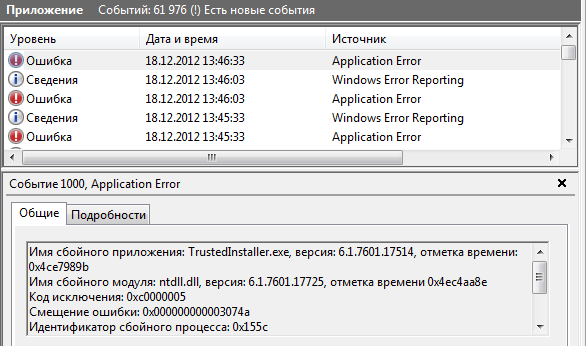
Details of the crash:
Имя сбойного приложения: TrustedInstaller.exe, версия: 6.1.7601.17514, отметка времени: 0x4ce7989b
Имя сбойного модуля: ntdll.dll, версия: 6.1.7601.17725, отметка времени 0x4ec4aa8e
Код исключения: 0xc0000005
Смещение ошибки: 0x000000000003074a
Идентификатор сбойного процесса: 0x155c
Время запуска сбойного приложения: 0x01cddd155365136f
Путь сбойного приложения: C:\Windows\servicing\TrustedInstaller.exe
Путь сбойного модуля: C:\Windows\SYSTEM32\ntdll.dll
Код отчета: 9183e05c-4908-11e2-893c-005056c00008
This recommendations helped me: http://support.microsoft.com/kb/946414
In short, they recommend to open Regedit (Press Start->type in search "Regedit"), then find the following registry keys and delete them:
- HKEY_LOCAL_MACHINE\COMPONENTS\PendingXmlIdentifier
- HKEY_LOCAL_MACHINE\COMPONENTS\NextQueueEntryIndex
- HKEY_LOCAL_MACHINE\COMPONENTS\AdvancedInstallersNeedResolving
On my PC there was only PendingXmlIdentifier one. This stopped the TrustedInstaller.exe crashes and helped to solve the problem.
Also, there is an article by chentiangemalc here that describes another cause of crashing and more detailed way to investigate and solve the problem http://chentiangemalc.wordpress.com/2012/06/07/case-of-the-totally-broken-trustedinstaller/
Hope this will also help you.
How to change the master sound volume in Windows Programatically
Many C++ developers already know CVolumeOutMaster classes by published on CodeProject. These classes allow easily regulate and track the changes of such volume controls as Output Master Volume, WaveOut Volume and Input (WaveIn) Volume
Unfortunately these classes are not compatible with Windows 7. But in factm It's actually easier in Windows 7 Vista than it was in XP. For Windows 7, you have to use
A tiny app that demonstrates IAudioEndpointVolume COM interfeace for setting master volume. To save space, all error checking was removed.
Read more: How to change the master sound volume in Windows Programatically
Google+ Has 400 Million Members
Google‘s social network Google+has more than 400 million members, Google’s Senior Vice President of Engineering Vic Gundotra has announced.
Gundotra posted the news on his Google+ profile today, adding that Google+ also has 100 million monthly active users — if you count in the mobile app.
“This week we also hit an important milestone–over 400,000,000 people have upgraded to Google+. It was only a year ago that we opened public sign-up, and we couldn’t have imagined that so many people would join in just 12 months,” wrote Gundotra.
For comparison, Google+’s biggest competitor, Facebook, had 955 million active users in July.
Of course, the methodology of counting active users (as opposed to the total number of users who’ve signed up for the service) between the two companies may differ, but judging by these numbers, Facebook is approximately 10 times bigger than Google+.
That may sound like a big advantage for Facebook, but one also has to take into account that it took Facebook several years to reach 100 million active users, while Google+ managed to do that within 12 months.
Review of the Mailchimp E-mail marketing service
Email marketing and mailing lists are still very relevant today, even in today's "socially oriented" world. Mailing lists as an important marketing tool are recommended by many experts as an effective means of advertising or promotion of a product or resource. So, today we decided to disclose this topic in detail. Here is our review of the world's leading mailing list building service - MailChimp. We are pretty sure that even the email marketing experts will be astonised by opportunities that MailChimp offers. This service has won the "Oscar for web sites" of 2006 - the Webby Award in the category "Best IT or Hardware Web-site".
More about creating a good Meta Tags
The Meta Keyword Tag
The meta keyword tag allows you to list the keywords for the page; however, most search engines do not support this tag.
What search engines use the Meta Keywords Tag?
Of the major search engines: Inktomi and Teoma are the few that even take this tag into consideration.
How to write Meta Tags to improve SERP position?
Many people think meta tags are the magic solution to ranking well. Create the perfect combination with the perfect keyword density and presto! Well, that is far from being true - there is more to SEO than good meta tags and there are also many off-page factors. However, it does help to have highly optimized Meta tags.
What are Meta Tags?
Meta tags are parts of an HTML document that are used for you to describe the page content for search engines. Meta tags are placed within the head area of an HTML file and with the exception of the Title tag; your visitors do not see them as part of the viewable area of the page.
Create Sitemaps to improve search engine crawling efficiency
What are Sitemaps?
Sitemaps are an easy way for webmasters to inform search engines about pages on their sites that are available for crawling. In its simplest form, a Sitemap is an XML file that lists URLs for a site along with additional metadata about each URL (when it was last updated, how often it usually changes, and how important it is, relative to other URLs in the site) so that search engines can more intelligently crawl the site.
Read more: Create Sitemaps to improve search engine crawling efficiency